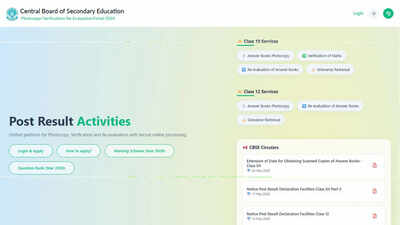

NEW DELHI: The Central Board of Secondary Education (CBSE) has activated the portal for verification of issues observed in scanned answer books and re-evaluation of answers for Class 12 students. The facility is available only to candidates who have already obtained photocopies or scanned copies of their evaluated answer books.Along with launching the portal, CBSE has also introduced Aadhaar-based verification as part of the login and authentication process. Students can now submit requests for correction of issues in scanned answer sheets, including missing pages, blurred copies and missing supplementary sheets, as well as apply for re-evaluation of specific answers.Who can apply?Only those students who have already received scanned copies of their evaluated answer books are eligible to use the verification and re-evaluation facility.Students who meet this eligibility condition can log into the CBSE portal and choose one or both services depending on their requirements.The portal will remain open from June 2, 2026, to June 6, 2026 (midnight).Aadhaar authentication mandatoryCBSE has made Aadhaar verification compulsory for accessing the portal.Students are required to enter Aadhaar details during the login process. According to the Board, this step has been introduced as a security measure to verify user identity and ensure secure access to the application system.For students who do not possess an Aadhaar number, CBSE has permitted the use of Aadhaar details belonging to a parent, guardian or relative.However, in such cases, the name, date of birth and gender entered during authentication must correspond exactly with the Aadhaar details of the person whose Aadhaar number is being used.
How to apply for verification of issues and re-evaluation
Step 1, Confirm eligibility: Candidates must first ensure that they have already received the scanned copy of their evaluated answer book. Only eligible students will be allowed to proceed further.Step 2, Login to the portal: Students need to visit the CBSE portal and log in using their credentials. Aadhaar authentication will be required at this stage.Step 3, Select the required service: After login, candidates can choose* Verification of Issues* Re-evaluation of Answers* Both servicesStep 4, Enter subject details: For verification requests, students can select subjects and report issues such as* Missing pages* Missing supplementary sheets* Missing maps or graphs* Blurred pages* Incorrect answer book supplied* Evaluation against a different question paper setFor re-evaluation, students must provide details such as subject name, question number and page number.Step 5, Make online payment: The prescribed fee is* Rs 100 per answer book for verification of issues* Rs 25 per question for re-evaluationPayments can be made through UPI, debit card, credit card or net banking.Step 6, Submit and save application ID: After successful payment, the application will be submitted and an Application ID will be generated. Students should save this ID for future reference.Step 7, Track application status: Candidates can log into the portal at any time to track the status of their application and view payment history and updates related to verification and re-evaluation requests.CBSE has advised students to carefully review all details before clicking the “Freeze and Proceed to Payment” option, as no modifications can be made after submission.